
SMB Now - Small & Medium Business Magazine
Tech Travel Agent, your one point of contact. Find us on
Google+  &
Facebook

Follow us on Google+
      Saturday, February 04, 2012

 Subscribe in a reader


Editor Login

SMBnow.com / SMB Web and Email

SMB Web and Email

Web and email services are vital for public and private websites. New technology offers better, more reliable web services that are very cost efficient. SMBNow covers all the latest news web service trends, tips, and faqs.

SMB Tips: 15 Ways to Overcome Overload...

Now that the presents have been unwrapped and the halls have been undecked, it’s back to the daily grind. And while you’d love to feel energized and excited about jumping into 2012, instead you’re weighed down with dread. You know the second you step foot in your SMB office you’ll be hit with 20+ tasks to add to your to-do list and an inbox full of e-mails begging for an immediate response. You’ll start January 2 feeling overwhelmed and incapable of getting everything done—and 2012 will become another year of wishing things were different.

          It’s true, says Jason Womack: For too many of us, feeling anxious and overwhelmed has become the new normal. But 2012 can be the year you finally get a handle on your to-do list and start working—and living—at your best.

          “Most of your dread doesn’t come from the work itself—it comes from how you think about the work,” says Womack, a workplace performance expert, executive coach, and author of the new book Your Best Just Got Better: Work Smarter, Think Bigger, Make More (Wiley, February 2012, ISBN: 978-1-118-12198-6, $24.95). “The psychological weight of unfinished tasks and unmade decisions is huge. There is a constant feeling of pressure to do more with less. You can’t change that reality…but you can make peace with it.”

          Womack’s book is packed with strategies, tactics, tools, and processes to help readers consistently and incrementally improve their performance at work. It teaches the fundamentals of workflow and human performance and spells out how to get more done, on time, with fewer resources, and with less stress. But more than that, it provides brilliant insights into why we tend to do what we’ve always done—and how we can break out of the patterns that hold us back.

          “The first step to changing the way you get things done is to accept that you’re never going to get it all done,” says Womack. “You’ll always be updating your to-do list by crossing off completed tasks and adding new ones…and that’s okay. When you improve the way you approach the things you need to get done, both on the job and off, you’ll stop wishing things were different and start really making new things possible.”

          Read on to learn more about the essential good habits you can create in 2012 and make it your most productive year yet.

1. Purge and unsubscribe. When Womack suggests reducing your psychological burden, in some cases that means reducing your literal burden. Start 2012 by deleting and recycling to make room for the “new” of the new year. Too many people let a backlog (paper AND digital information) pile up over the last six weeks of the year.

“Get rid of everything you can and reduce what might be coming in,” advises Womack. “Unsubscribe from e-mail newsletters, magazines, book-of-the-month clubs, perhaps even the ad-hoc committees you’ve joined recently. Try the ‘unsubscription’ for three months; at the end of those 12 weeks, you can re-up if you want to!”

2. Block out your time and prioritize. Ask yourself this: How much time do I really spend each day clicking through e-mails and making my to-do list? The answer is probably a lot. When you spend your day making giant to-do lists or flagging “urgent” e-mails, you’ll never get any real work done. Instead look at your day and figure out where you have blocks of time to really focus and engage on what needs to be done.

Time blocking and prioritization are two important keys to daily productivity, says Womack. Look at your to-do list, figure out where you have blocks of time to act on those items, and then prioritize. “I keep my defined ‘work’ actions to 15 to 30 minutes each,” he says. “These are the ‘chunks’ of time I can use to stay focused, minimize interruptions, and work effectively.”

On that first day back after vacation, you might also designate specific “Interrupt Me” times during the day for the first couple of weeks of the year. This lets people know that you’ll be working “head down” for larger blocks of the day and encourages them to “think-bunch-interrupt” so you get more done at once, instead of getting interrupted multiple times per day.

3. Change how you manage e-mail. The moment you click on your inbox, your focus goes and your stress grows, as you proceed to delete, respond, forward, and file the messages you find there. You see names and subject lines and suddenly your mind starts racing; all you can think of are the latest projects, the “loudest” issues, and the high-priority work that shows up. If you’re not careful, all you’ll do all day is manage your e-mail.

Rather than simply flag e-mails that require action, use the subject lines to catalog and organize them, suggests Womack. For example, you might put “Follow-up Call” in the subject line of an e-mail about a meeting you just had with a client. Also, don’t look at your e-mail unless you have a block of time to devote to prioritizing them and responding to them. When you are going through your e-mail, use subject lines to catalog them and organize them so that you’ll easily be able to go back to less urgent e-mails later on.

4. Take technology shortcuts. Womack writes about a client of his who easily wasted over three hours a week organizing her e-mails into the 300+ folders she had down the left-hand column of her Microsoft Outlook. And those three hours didn’t include the time she knew she’d have to spend catching up—putting most of her 7,000 inbox e-mails in those folders! Womack shared with his client a few specific features (rules and search folders) of Microsoft Outlook that would enable her to cut down considerably the time she spent organizing her e-mails.

“My client now spends less than an hour a week filing her messages,” says Womack. “And while an e-mail system is what worked for her, practically every kind of software you use daily has tricks and shortcuts that once implemented could save you a lot of time. Sit down with those who can teach you more about these systems. The more you fully understand the tools you use the easier it will be to learn even more about their features and how to use them to your advantage.”

5. Break inertia. Ever watch a freight train start to move? That first forward jolt takes the most energy; keeping the train rolling is much easier. Do some small things to get rolling on getting caught up at the beginning of the year. Then pace yourself. You’ll probably find it’s much easier to keep rolling along at a comfortable clip.

“We build up such a sense of dread that what we have to do seems insurmountable,” explains Womack. “Once you get started with something small and manageable, you almost always realize ‘Hey, this isn’t so tough after all.’ And soon you find that you’re making real progress—and it feels good.”

6. Keep your BlackBerry out of bed. Womack writes about a client who listed “Check e-mail on Blackberry (in bed)” as part of his daily morning routine. Note that he didn’t do anything about those e-mails while still in bed. He waited until he was commuting to work (he had a 40-minute train ride to the office each day) to start taking action. Then, he said, he rushed through his morning worrying about the e-mails he had read in bed.

“Together, he and I designed a five-day experiment during which period he would leave his mobile device in another room and use an alarm clock to wake up instead of his phone,” says Womack. “He would shower, dress, eat breakfast, and then check e-mail on his train ride to work. Initially, he expressed concern that he might miss the ‘thinking about what I have to think about’ time he had built in to the early part of the day, but he was willing to give the experiment a try.

“When I called him the following week, he had good news,” Womack continues. “The experiment had worked. He was less stressed and was using his morning more productively. This change in his routine gave him a higher quality of life with less stress and increased productivity—one he didn’t know was possible without falling behind in his work.”

7. Always be prepared for “bonus time.” This is a great strategy for increasing productivity throughout the year, but it will be especially helpful in the days following your holiday vacation (or any break). Bring small chunks of work with you wherever you go. Then, while waiting for a meeting to start or for a delayed flight to depart—Womack calls these unexpected blocks of free time “bonus time”—you’ll be able to reply to an e-mail or make a phone call. In other instances, you might have enough time to review materials for another meeting or project you are working on. If you’re prepared, you can also confirm appointments, draft responses, or map out a project outline.

“I can promise you that sometime during the next month, someone is going to arrive late for a meeting with you, cancel a meeting, or otherwise keep you waiting,” says Womack. “When that inevitably happens, you can look over your to-do list and pick something—anything—to work on.”

8. Reduce meeting time lengths. If meetings at your organization are normally given a 60-minute time length, start giving them a 45-minute time length. You’ll find that what you get done in 60 minutes you can also achieve in 45 minutes. You’ll also gain 15 extra minutes for each meeting you have.

“Usually, we fill the time we expect to fill,” says Womack. “Give yourself less time and you’ll get it done in less time. The shorter time frame really gets you focused. All that extra time will really add up and provide you with more time to work toward your goals.”

9. Figure out what distracts you. It can be extremely helpful to discern exactly what it is that gets in the way of your focus. Identify what is blocking your ability to give all of your attention to what needs your attention. Is it the constant ding of e-mails popping up in your inbox? Is it employees or colleagues who need “just a minute” of your time? Once you have this inventory, you can begin to make subtle changes so that you wind up getting more done, in less time, at a higher level of quality.

“I look for what I call the ‘big two’ when I’m coaching clients,” says Womack. “Together we uncover just two common interruptions or distractions that are getting in the way of their getting more important work done each day. My goal is to minimize the kinds of distractions in my clients’ work world that can easily pull them away from doing the meaningful, important, prioritized work they need to get done.”

10. Divide your projects into small, manageable pieces. Take one step at a time and don’t worry about reaching the ultimate goal. Make use of small chunks of time. In fact, a great way to approach this is to break the yearly goals down into quarterly goals. Now that you’re back, there are X number of weeks left in the first quarter. If you worked on a goal only two hours each week (perhaps over four 30-minute sessions) you’ll have a total of X hours to invest in that goal. Set milestones, decide actions, and make progress faster.

11. Identify the VERBS that need attention. (And here’s a hint: Smaller is better.) Organize your to-do list by verbs in order to manage your productivity in terms of action, delegation, and progress. Actions such Call, Draft, Review, and Invite are things that you can do, generally in one sitting, that have the potential to move the project forward one step at a time.

“If your to-do list has ‘big’ verbs—by which I mean verbs that are mentally demanding or longer term in nature such as plan, discuss, create, or implement—replace them with action steps to just get started,” says Womack. “That is, pick ‘smaller’ verbs, by which I mean verbs describing tasks that are easier to start and faster to finish. This will save you time and reduce the sense of overload you’re feeling.”

12. Learn to delegate clearly (much, much more clearly). Come to terms with the fact that you can’t get it all done yourself. Identify exactly what needs to be done and by when. Over-communicate and (if you need to!) track what you have given to whom.

“Check back weekly with your ‘Waiting on…’ inventory and follow up with people who you think may wind up falling behind,” urges Womack. “Be relentless. After all, if the people you delegate to aren’t productive, you won’t be productive either.”

13. Hold yourself accountable with end-of-day notecards. At the end of each day, for the first 20 or so workdays of January, write down (on a 3x5 notecard) basic things about each day: Who you met with. What you completed. Where you went. What you learned. At the end of the month, you can use this “inventory of engagement” to identify what you want/need to do more (or less!) of.

“It is essential for you to be conscious of how much work there IS that you have taken on,” says Womack. “When you see how much you ARE doing—or how little of the right things—you will be motivated to ‘get better.’ This activity is a great way to hold yourself accountable and make sure you’re really doing the things that help you make the most of your time.”

14. Implement a weekly debrief. Take time after every five-day period to stop, look around, and assess where you are in relation to where you thought you would be. Look at three key areas: 1. What new ideas have emerged? 2. What decisions need to be made? 3. How do I track this information?

“Not only does the weekly debrief help you hold yourself accountable, it allows you to course-correct if necessary,” notes Womack. “Things usually don’t go the way we expect them to, so these weekly debriefs give us the opportunity to ask ourselves, Does this still make sense? And if not, what does?”

15. Forecast your future. Open your calendar to 180 days from today. There, write three to four paragraphs describing what you’ll have done, where you’ll have been, and what will have happened to your personal/professional life by then. This kind of “forecasting” is good to do from time to time, and by spending ten or so minutes at the beginning of the year thinking about the next six months, you’ll put your goals into action.

“What we think about is what we do,” says Womack. “Identifying what we’d like to experience is the first step in developing the habits and actions that move us closer to our goals. That ten minutes is the starting point in moving off the ‘thought trails’ that force you into thinking what you’ve always thought—and doing what you’ve always done.”

          “There’s a reason we’re so drawn to New Year’s resolutions,” says Womack. “On a deep, fundamental level we want to get better and better, both on the job and off. There is no reason to remain mired in frustration and struggling to catch up. Life can be a wonderfully exciting journey, and it can start whenever we want it to start. January of 2012 is as good a time as any.”

About the Author:

Jason W. Womack, MEd, MA, provides practical methods to maximize tools, systems, and processes to achieve quality work/life balance. He has worked with leaders and executives for over 16 years in the business and education sectors. His focus is on creating ideas that matter and implementing solutions that are valuable to organizations and the individuals in those organizations.

Author of Your Best Just Got Better: Work Smarter, Think Bigger, Make More, Jason shows that working longer hours doesn’t make up for a flawed approach to productivity and performance. Entrepreneurs need to clarify their habits, build mindset-based strategies, and be proactive. Womack’s signature workplace performance techniques offer specific strategies to consistently and incrementally improve performance. For more information visit www.womackcompany.com.


View & Leave Comments


3 SMB Web Security Tips

by Alan Wlasuk

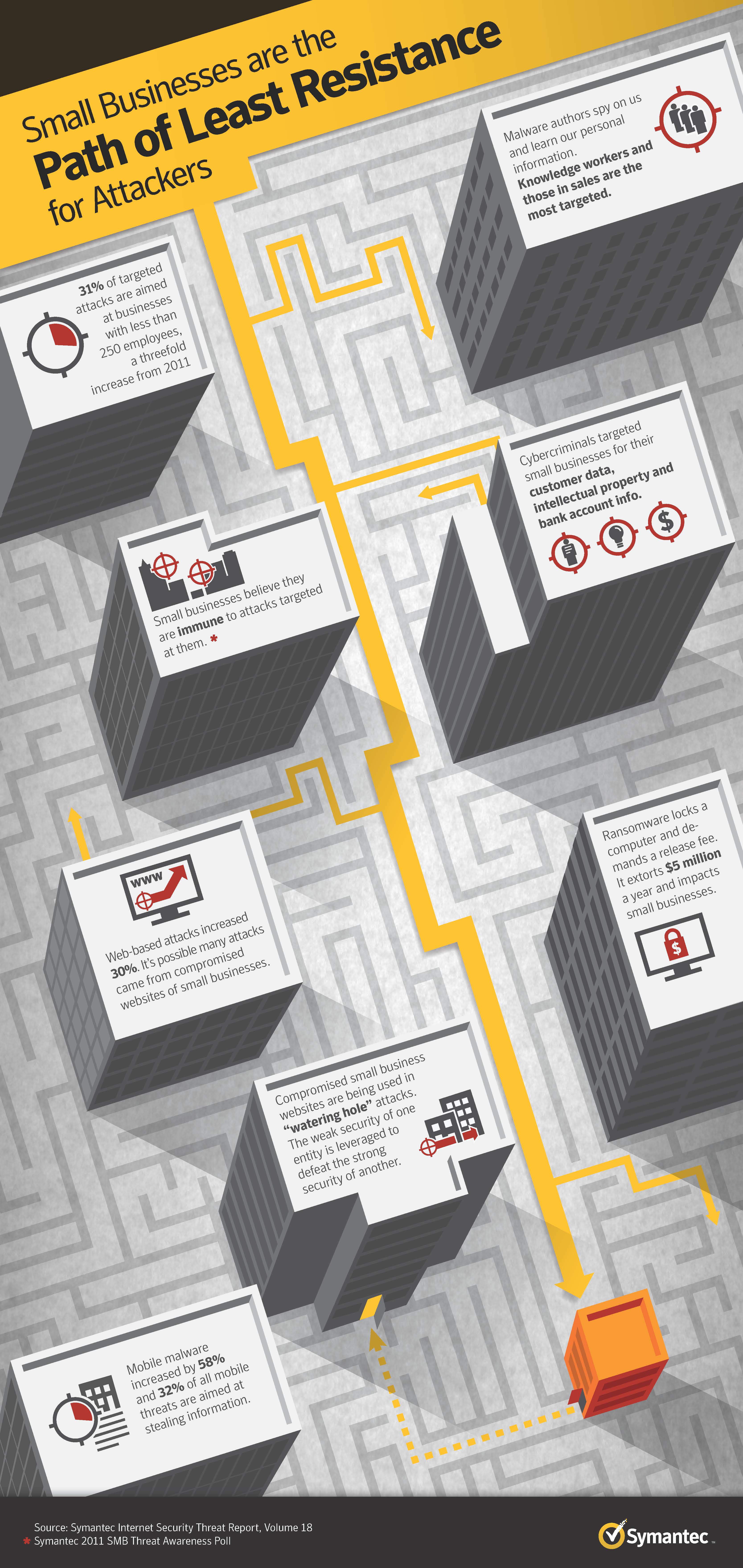
According to recent research, 73% of organizations have been hacked at least once in the last 24 months through insecure web applications, including websites. And with the public breaches of Sony, RSA, and Citigroup most SMB owners often believe that hackers would never target their site. However, the truth is that small businesses are the more frequent, less publicized victim of hackers taking advantage of website vulnerabilities. While, there are numerous things you can do to increase your site’s security, here are some lesser-known tips to help you maintain a secure website and assure your business isn’t the next victim of these unfortunate (but not uncommon) incidents. 

1. Think twice before implementing custom web applications – Custom web software is notorious for being insecure. Most development teams do not have security development skills, and only a very few have the capabilities for testing for web security. Many web design firms (specializing in design as opposed to technology) use their own, custom built CMS (Content Management System) that are almost always insecure.

2. PCI Compliance – Understand your need, or lack thereof, for PCI Compliance. If you are breached while in violation of PCI Compliance your financial penalties could be huge.

3. Review your access logs – A surprisingly large number of security breaches are discovered by accident or when the breach is reported to the attacked company. Hackers often revisit a company after a breach, expecting the company to be oblivious to previous hacks.

About the Author
Alan Wlasuk is a managing partner of 403 Web Security, a full service, secure web application development company. Alan’s a Bell Labs Fellow award-winner with 18+ years of experience building secure web applications. From web security evaluation to secure web development and remediation, 403’s seasoned developers have secured web-based applications against hackers andsecurity breaches. Drawing upon the company’s involvement with Software Quality Assurance (SQA), security is always at the forefront of any development efforts. To learn more about 403 Web Security or for a complementary vulnerability scan of your website, please visit: www.403.wddinc.com.

Find out what is going on in the Tech Army World.

What are the Top 10 Money Making Missions?
What other companies have joined and what do they do?
How do I join the Tech Army Organization ?


View & Leave Comments


SMB Web: hotfrog can help with Traffic

HotFrog

Laugh n Leap


SMBs Experiences Significant “Leap” in Web Traffic with hotfrog

With over 20 million business listings in the US, hotfrog is the world’s fastest growing online business directory*.  Soon after South Carolina-based inflatable rental company, Laugh N Leap, listed on hotfrog, web traffic significantly increased and the company began to see the benefits of online marketing. 

Overview

Laugh N Leap has provided bounce houses, inflatable obstacle courses and waterslides that bring fun and excitement to children’s parties in the Columbia Metro area of South Carolina since 2009. After owner Robert Brannan started renting out the inflatables on a freelance basis in late 2008, word spread quickly and the demand warranted that he create an official business. Currently, Laugh N Leap brings joy to all sorts of parties – serving parents of children ages three to 12, as well as schools, churches and daycares hosting special events. With three towns in the Columbia Metro area, Laugh N Leap regularly delights the locals with its party inflatables. 

Challenge

Starting a small to medium business (SMB) comes with a full set of challenges, with one of the most significant ones being marketing and creating awareness for your brand. Robert initially gained popularity through word of mouth, providing bounce house rentals on a freelance basis. However, he soon recognized the need to get Laugh N Leap’s name into the many towns of the Columbia Metro area. Knowing that the Internet was the fastest way to reach his customers, Robert knew he needed to focus on online marketing from the very beginning in order to be successful.  

Solution

Aware that a listing in an online business directory such as hotfrog would help drive traffic to Laugh N Leap’s website, Robert created an upgraded listing with hotfrog’s AdVantage. The result was a sleek, professional online ad without the clutter of banner ads. hotfrog also provided Robert the opportunity to create individual postings for his different products. With several different names for bounce houses – jump castles, moon bounces, moonwalks – the individual postings brought potential customers to Laugh N Leap no matter how they searched for the product. These individual pages provided potential customers with a comprehensive view of Laugh N Leap’s offerings, while driving traffic to the Laugh N Leap website.

Result

When asked if hotfrog helped to increase his website traffic, Robert Brannan’s immediate answer was, “Absolutely, I’ve had approximately 430 click-throughs to my website over the past 12 months.” Laugh N Leap’s owner knew how important online marketing would be when he started his SMB and he has been impressed with hotfrog’s solution. In the last year, Laugh N Leap has received almost 4,000 views on hotfrog with 438 total leads from the listing. Robert is excited to receive even more success as he continues his partnership with hotfrog and embarks on his peak rental season in March. 

hotfrog URL:http://www.hotfrog.com/Companies/Bounce-House-Rental-Columbia-SC-LAUGH-N-LEAP

* Accurate as of December 2010

A Copier Rental is a quick way to mass produce important documents for potential customers at an event or conference. Renting office equipment is simple and easy and it can also save you loads of time and money. Rentacomputer.com has been offering copier rentals to more than 1000 cities worldwide for over 20 years.

View & Leave Comments


SMB Marketing: Email vs. Social Media
Do you have an intern running your company social media? Email vs Social Media Marketing LeapFrog Interactive Educates Marketing Organizations As part of LeapFrog Interactive’s continued education efforts, Christy ...
Read More >
New Microsoft Outlook Tool for SMBs
Mail manager LAUNCHES ‘SNAP ‘n’ SEND’ SCREEN GRAB EDIT TOOL and new windows mobile version Snap ‘n’ Send lets users capture and combine on-screen images, add markups and text and send th...
Read More >
SMB Time is Money and by Time, I mean ...
By Peter Melerud, KEMP Technologies In business, time is money. This is especially true for small businesses where each click on the website could mean a new lead or sale. So, what happens when your website goes down when a po...
Read More >
Public Email and the Sunshine Law
by John BeagleRecently, angry parents sued the Mason, Ohio School Board* for not providing emails sent and received by school authorities on school computers. Bottom Line: Mason Schools may be a violation of the Ohio Sunshine Laws**. This may be a...
Read More >
Adding an E-Store is still worth the m...
Have something to sell? Get an E-Store. The growth of online shopping has been nothing but amazing since the inception of the internet. Though if you do your research you will see that the numbers are starting to level off there is still a defini...
Read More >
Small Businesses Embrace Web Marketing
Some small-business owners are successful without help from the Internet. But as Web presence increasingly becomes a measure of credibility, the advantages and growing ease of creating a business website are prompting more holdouts to make the leap. ...
Read More >
Yahoo! Phishing Protection from SMB co...
Is your SMB Website Old School? (Upgra...
Smaller Search Engines Matter for your...
Get your SMB Website in Yahoo Director...
SMBs use of FrontPage
Link up Your SMB Website
Goodmail good for SMBs?
How To Build An E-mail Program
Bad Email Campaigns
Delivering your SMB Message via the We...
Google gets Jagger Upgrade
Social Inter-networking
SMB: Test Your Email Strategy
Who Are The Real Pirates?
SMB Website = Growth
What To Look For When Hosting Your Web...
SMB News Archive
>
  SMB Tag Cloud
  accounting business computer computer rental computers google hr internet marketing sales security smb technology tips web
   
  SMB Now Endorsed
 

Rentacomputer.com is an SMB


Camera Security Now
Camera Security and Surveillance


Computer Service Now


Laptop Rentals
Laptop/Notebook Rentals


Projector Rentals Nationwide
LCD Projector Rentals


SMB Now Approved:

Denver Mortgage loans

Miss Bui Simon

Accountants professional liability insurance

Hostgator coupons for SMBs

SMB Construction Company


All approved SMB were subject to our editorial standards of approval prior to endorsement here.
 
If you have an SMB targeted company, please send SMB news story ideas to:
 
 
Visit other Xponex Web and Media News Publications
Main Street Monroe    Middletown USA


Copyright ©2012 SMBNow.com    Privacy Statement